
Leveraging Google Docs for SMB Efficiency
In today’s fast-paced business environment, small and medium-sized businesses (SMBs) must find efficient ways to manage their workflows.
Google Docs emerges as a powerful tool in this regard, offering versatile features designed to enhance productivity.
Creating a Streamlined Workflow with Google Docs
Why Bother?
Why is Google Docs Essential for Your Business?
A simple scenario: You’re scrolling through a comprehensive manual, desperately seeking the section on “Profit Maximization Strategies.” It’s more than frustrating; it’s time-consuming.
A Table of Contents (ToC) in your document acts as a navigator, easing this process significantly. It serves as a guide through extensive documents and a quick access point to specific sections – a true game-changer for any business paperwork.
Table of Contents: Your Document GPS
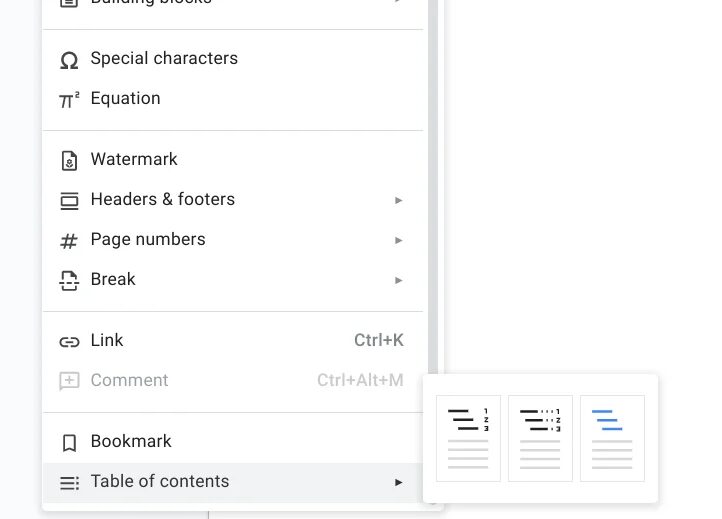
How to Set Sail
- Open Your Treasure Map: Start with your Google Doc. It’s more than just a blank canvas; it’s the beginning of an organized workflow. Let’s make it navigable.
- Mark Your Spots: Use the “Heading” format for section titles. Think of them as islands in your vast document ocean. Google Docs uses headings to auto-generate your ToC.
- X Marks the Spot: Decide where your ToC will anchor. Click “Insert” > “Table of contents” and choose your style. The choice is yours, whether it’s page numbers or blue hyperlinks.
- Update as You Explore: When adding new sections like “Navigating Market Storms,” simply right-click your ToC and “Refresh” to include the new headings.

Pro Navigator Tips
- Consistency is Key: Stick to a heading hierarchy (e.g., “Heading 1” for chapters, “Heading 2” for sections) for a tidy ToC.
- Pageless Format?: If you’re sailing the modern “pageless” seas, remember formatting options for your ToC might be limited.
Maximizing productivity with Google Docs goes beyond creating documents. It’s about automating and simplifying your procedures.
Google Docs Templates for Automation
The Magic of Templates
Why reinvent the wheel with every document when you can automate? Templates are your blueprint; automation is your construction crew.
Templates: Your Efficiency Sidekick
Templates are the unsung heroes of document creation. They’re like a pre-baked pie crust waiting for your unique filling.
For example, a marketing plan template can have pre-set sections you fill in with specific data. The pre-set sections ensure consistency and save time, allowing you to focus on strategy rather than formatting.
Setting Up Your Blueprint
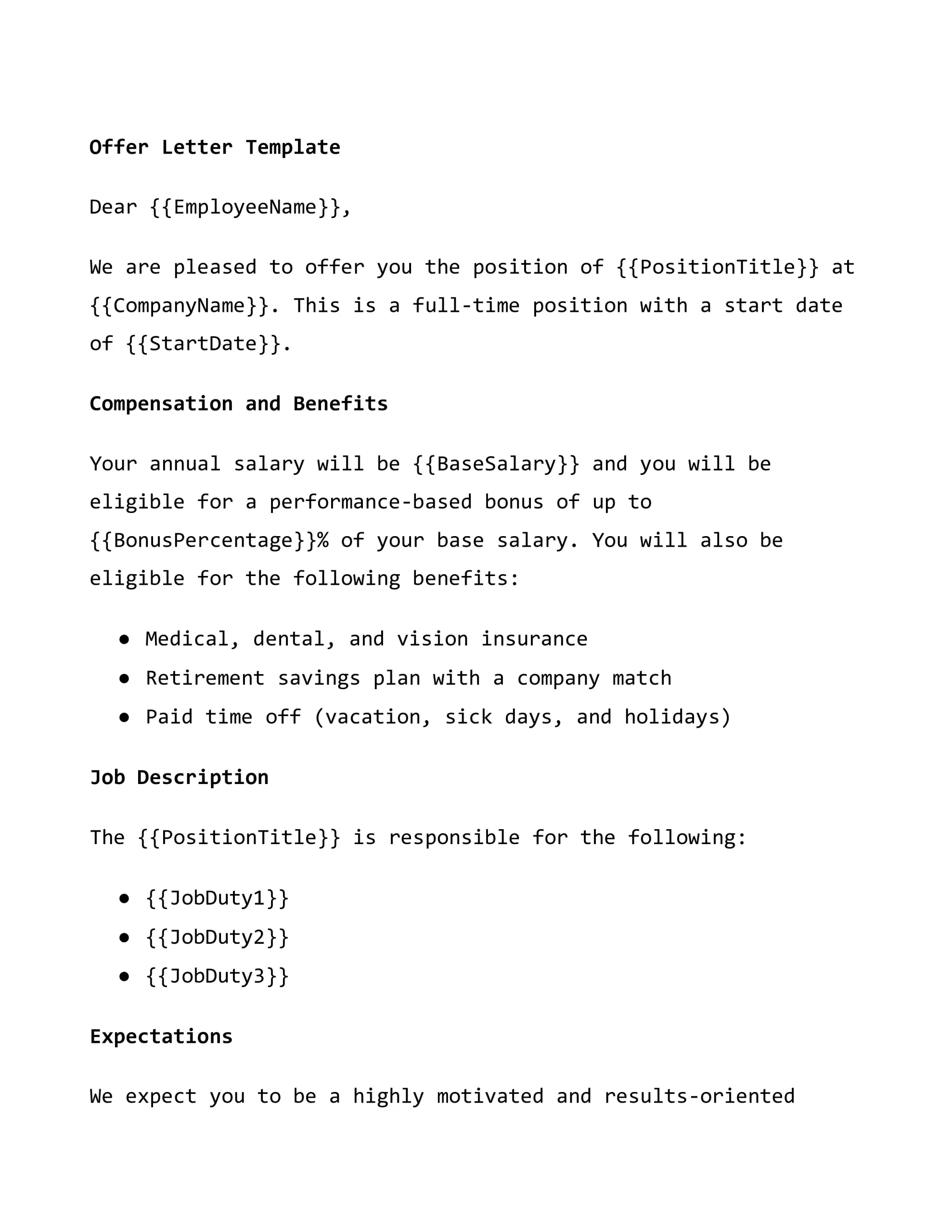
- Create Your Template: Design a Google Doc template with placeholders for the information that changes (e.g., client name, project details).
- Automate with Zapier: Use Zapier to create Zaps that fill these placeholders with data from apps like Google Sheets or Forms.
Combining ToC and Templates: A Power Duo
You get a supercharged tool when you merge a ToC with a template. Imagine a marketing plan template with a built-in ToC. As you fill in the sections, the ToC updates, creating a document that’s both easy to navigate and uniform in appearance. This combo is a time-saver and adds a professional touch to your documents.
Real-World Applications
Marketing Plan Mastery
A small business owner can use a marketing plan template from Google Docs to outline their strategy.
They’d start by filling in sections like “Objectives,” “Target Audience,” and “Tactics.” The ToC would reflect these sections, making the plan easy to review and adapt as strategies evolve.
Contract Creation
You can automate contract creation by merging data into a template using the Google Docs API.
Placeholders like {{client-name}} can be replaced with actual client data, generating personalized contracts quickly and reducing the risk of human error.
Project Proposals
A project proposal template can streamline pitching new ideas[6].
With a ToC, team members can easily navigate to sections like “Scope,” “Timeline,” and “Budget,” ensuring that all aspects of the proposal are accessible and transparent.
Benefits of ToC and Templates
- Time-Saving: Automate repetitive tasks and focus on content.
- Consistency: Maintain a uniform structure across documents.
- Professionalism: Present well-organized, easy-to-navigate documents.
- Adaptability: Easily update and modify documents as needed.
Example: Automating Invoices
- Prepare Your Invoice Template in Google Docs. Wherever dynamic info goes (like “Client Name”), insert a unique placeholder (e.g., {{Client Name}}).
- Set Up a Trigger: You use Google Forms to collect order details. In Zapier, create a Zap that triggers every time a new form response is submitted.
- Action Time: Choose “Create Document from Template” in Google Docs as the action—map form responses to your placeholders.
- Voilà! Each form submission now generates a personalized invoice, saving you time and reducing errors.
Why It’s a Game-Changer
- Efficiency: Automate repetitive tasks, focusing your energy on what truly matters—growing your business.
- Accuracy: Minimize human error. Let the machines do the heavy lifting, ensuring your documents are always spot-on.
Google Docs stands as a beacon for SMBs, guiding them toward a destination of efficiency and professionalism. By embracing tools like Tables of Contents and Templates, your business can enhance its productivity significantly.
Remember, in the world of SMBs, efficiency not only saves time—it drives growth.
